
Modern-day browser caching, and why you should pay more attention to it
As is always when I come across a topic to research on, I go deeper down the rabbit hole than needed.
This time, I dove into the world of browser caching, how exactly it works, how it changed over the years, and why the gurus selling system design courses who tell you that “a CDN will solve all your problems” are lying.
Browser caches have evolved a lot over the years. Throughout the article, for awareness, I’ll also touch on some old standards that might still be accepted by some browsers, but shouldn’t be something you rely on to get consistent behaviour.

What exactly is a cache?#
Caches are meant to be a way to store your data to get it faster - typically these sit in a layer in between where your data actually resides, and where the data is requested. Caches usually store frequently accessed data to avoid having to process and retrieve data from the source again.
Your CPU has multiple layers of caching to avoid going all the way to the main memory to fetch data. Reverse proxies can cache data instead of repeatedly hitting the origin server. CDNs cache data across the globe to serve requests closer to the user. But most importantly, and frequently forgotten - your browser can cache resources you have already requested before from the server.
Why does it matter?#
Caching at the browser costs you absolutely nada, and can improve page interactivity and performance without having to bring up any other infrastructure. Browser caching isn’t the panacea for all performance issues you will face - there are some genuine use cases for each microservice having its own application cache. But sometimes, if you take a step back and look at the bigger problem, you might just be able to solve it with a few characters in headers.
Browser caching#
Browsers cache data in many ways
- The HTTP Cache, the most relevant, keeps copies of resources you have previously accessed (HTML, images, CSS files etc.).
- The bfcache (sometimes) stores snapshots of your entire webpage so that you can instantly load the page on click of back / forward.
Other than these 2 browser managed caches, developers can use the Web Storage API to store custom caches (e.g. in a localStorage entry), and Progressive Web Apps can use the Cache API in Service Workers to store offline copies of data. A precursor to Service Workers, the AppCache, also existed, but was deprecated in 2016.
I’m no expert on PWAs (yet) - so I’ll leave that topic for another article. You can read more on how to develop an offline-ready app on web.dev.
HTTP Cache#
RFC 9111 is the latest revision of the HTTP Caching standards, and is adhered to on modern browsers. If you ever run into a scenario where your HTTP cache isn’t working how you expect it to, this document will help you find out why.
Cache-Control#
The primary driver of the HTTP Cache is the Cache-Control HTTP header. Conveniently, most shared caches like CDNs, reverse proxies etc. respect this header as well. The Cache-Control response header tells the browser how it should be managing the cache - things like how long the cache response can be stored, whether to store on shared caches etc.
Contrary to popular belief, not sending the Cache-Control response header doesn’t mean the browser won’t cache the response.
Browsers resort to Heuristic Caching when the header is missing - they get to decide how long they want to keep the entry. Section 4.2.2 provides some guidelines on calculating heuristic freshness (usually 10% of the time between now and Last-Modified HTTP header), but browsers can choose to implement any heuristic they want, or even not cache at all.
Always maintain a valid Cache-Control header to get consistent behaviour across browsers.
A bunch of directives can be provided to the Cache-Control response header (comma-separated) to instruct the requestor on how to handle the caching behaviour. (concepts of fresh and stale will be explained in detail later)
max-age=Ntells the browser how long to consider this response “fresh”, whereNis the number of seconds.no-storetells the browser not to store the data in the cache at all.no-cachetells the browser it’s OK to store the data, but every time you want to reuse the data, validate with the server first.must-revalidatetells the browser it’s OK to store the data, it’s OK to reuse it if it’s fresh, but if it’s stale it MUST revalidate with the server first. (Though this seems obvious, the standard allows caches to reuse stale data if, for example, the origin server is down)privateindicates the response should not be stored in a shared cache (CDN) andpublicsays it’s OK.- …and a bunch of other less frequently used directives. These might be important for certain scenarios you want to handle.
In some scenarios, Cache-Control can also be inserted into request headers by browsers to provide directives to proxy caches on what to do, like validating the response from the origin server even if it already has a fresh entry.


Some websites (like Google above) choose to use max-age=0 instead of no-cache as some older HTTP/1.0 caches didn’t support the no-cache directive. For the most part you can just use no-cache and not worry.
Vary#
The Vary header helps distinguish cache entries based on what influences the servers response. Typically caches consider the combination of URL and Method (GET, POST etc.) unique, but there might be cases where you want certain URLs to return multiple types of responses based on other headers. For example, you might want to serve translated content if the user sent a different Accept-Language request header.
In this case, you simply need to send Vary: Accept-Language to indicate that Accept-Language influences the content that is returned. Add only the required headers that would actually influence the response, or you would affect the performance of the cache.
You can read more on the principles of Content Negotiation and how the server decides what representation to give the user.
Using the Cache#
Once the entries are stored in the cache, the browser then needs to decide whether to use the cache entry or go to the origin server. The time between when the subsequent request is being made, and when the initial request was stored into the cache is called age.
- Any cache entry whose
ageis less than themax-ageis considered fresh and can be used as is. - Any cache entry whose
ageis more than themax-ageis considered stale, and cannot be used unless validated.
NB: If you set no-cache, as explained previously, fresh entries also need to be validated first.
NB2: Sometimes you will get an Age response header, which the browser then uses to store how much the entry has already aged before adding it to the cache.
Prior to the max-age directive, the Expires HTTP header was used to give an absolute Date & Time at which cache entries should expire. This is superseded by max-age, prefer max-age.
If the cache entry cannot directly be used, we enter the validation stage.
ETag & If-None-Match#
During the validation stage, the browser makes use of the ETag of the resource. The ETag or entity tag of a resource is just a hash of the current version of the resource - the server can choose whatever hash it wants to use to keep track of versioning.
It helps easily identify if a resources response has changed or not - if it hasn’t changed, there’s no need for the server to retransmit the entire response.
With each successful request, the response should contain an ETag. The ETag is then used by the HTTP Cache when it needs to revalidate the resource.
During revalidation, the browser sends the same request with an If-None-Match header set to the previous ETag.
A sample request to my website’s avatar is as follows :
curl -I 'https://vishnubhagyanath.dev/img/avatar.webp'Once the server receives this request, it will get the file, calculate an ETag and respond with the binary content of the image in the response body, and the ETag header containing the hash. Ignoring the rest of the HTTP output, you’ll see our two important lines - one telling it how to cache, and one determining the uniqueness for the current version
cache-control: public, max-age=14400, must-revalidate
etag: "b1145f5d6687e1d86c0d421774f6e8b0"
The browser can then reuse this data for the next 14400 seconds. Once that time is up, the browser will send a revalidation request. This will go with an If-None-Match request header.
curl -I 'https://vishnubhagyanath.dev/img/avatar.webp' \
     -H 'If-None-Match: "b1145f5d6687e1d86c0d421774f6e8b0"'
The server can return one of two responses - in case the response is still valid, and the ETag matches, there’s no need to retransmit the data - in which case it sends an empty response with a 304 Not Modified status code. In case the response is no longer valid, and the ETag for the response has changed, the response body is retransmitted with the new value and a 200 OK status code.
Last-Modified & If-Modified-Since#
An alternative method that HTTP caches can use, primarily for older servers that do not support ETag, involves the Last-Modified header. However, this approach is less preferred due to potential parsing errors with complex date formats. Similar to the ETag mechanism, the cache relies on the Last-Modified header provided by the server, which indicates the last time the resource was updated. When the cache needs to revalidate the data, it includes an If-Modified-Since header in the request, using the value from the previous Last-Modified response. Similar to the other implementation, the server can respond with 304 Not Modified or a 200 OK. Read more on MDN.
When you refresh the page, the browser adds a Cache-Control: no-cache REQUEST header to get a fresh version of the resource from the server’s cache.
Examples#
With all this information it might be hard to understand how to actually cache - I’ll provide some examples of common scenarios and combinations used.
Resources that never tend to change should make use of the cache, validation, and refetch mechanisms well. Resources that are expected to change in some arbitrary amount of time can look at Cache Busting as a way to serve updated files, where serving stale files can pose issues.
- For static content like images, think about using a
Cache-Controlcombination ofmax-age=N&must-revalidate. This helps ensure that the cache is used wherever possible, and once age is reached the browser will revalidate that the data hasn’t changed. An example is theavatar.webpexample shown above. - For content you are expecting to change, and require the user to get the newer version as soon as it does, consider Cache-Busting. This involves just adding a version string or a hash to the URI - either in the filename, path, or query. Along with this, set an enormous value for
max-ageso that the user never needs to get this file again - in case it ever changes, the browser should request the newly hashed file, since it’s considered a new resource, and not linked to the older version. (Like JS & CSS bundles, which would change on every deploy) - Never allow a browser cache to serve your
index.htmlpage without validation (no-cache) - this will prevent you from ever serving any new changes once you deploy. Any resources that are used by the main HTML page (Bundles, Static Content etc.) can be either cached appropriately or versioned for Cache-Busting. - For personalized content, use
privateto avoid CDNs from caching the resource. - For sensitive data, use
no-storeto prevent browsers from caching it.
These are just some use cases that might come up - evaluate the scenario for the resource that are in question and figure out what would be the appropriate combination of Cache-Control directives to use.
Older Antipatterns#
StackOverflow would be filled with tens of different ways to handle caches - half of these are long outdated and should be avoided. They are from the older HTTP standards which are not preferred anymore.
- Don’t use
Pragma: no-cacheas a reliable way to force revalidation. Use it only for backwards compatibility if you feel your userbase is specifically usingHTTP/1.0 - Don’t use the
http-equivattribute from HTML<meta>tag. It does not support Cache-Control. e.g. Chromium doesn’t readCache-Controlfromhttp-equiv.
Alas, this article too will one day become outdated.
Back/forward cache#
I’ll cover this very briefly as there is a great article on web.dev that I highly recommend reading if you want to know more about the bfcache. Most of the key concepts are covered there. The bfcache is entirely different from the HTTP cache, and though there are no official standards set out for bfcache design, there are some mentions on WhatWG
In short, the back/forward cache stores snapshots of entire webpages to make the backward / forward navigation smooth instead of reloading the entire page. If you see any different behaviour in your apps during normal navigation vs backward/forward, this is most likely something you want to dive deeper into.
To be able to see if your website is eligible to utilize the bfcache, simply open up devtools in a modern browser and head over to the Application Tab. You’ll be presented with a screen telling you details on why your website can’t be stored in the bfcache.
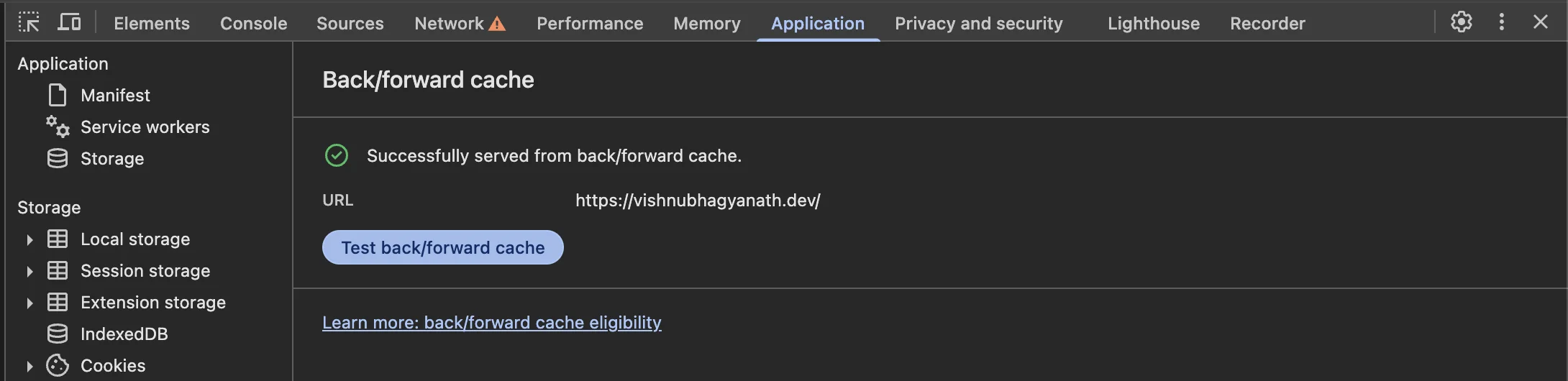
Using Cache-Control: no-store also prevents the bfcache from storing the webpage - avoid overuse of the no-store directive.
Analytics would also need to be specially handled to retrigger events for pages served out of the bfcache.
Putting it to use#
Hopefully, now with a better understanding of how browsers handle caching, you would be able to make more informed decisions to give end users a smoother experience. Evaluate each requirement carefully and plan out how you want the browser to handle caching for each scenario. Over the course of millions of requests, that’s going to be some heavy cost savings, performance, and user experience improvements you would have otherwise not paid attention to.
Till the next post, hej då!